 AI-First Culture
The Data Architecture Behind Real AI Coworkers and Why Chat History Isn’t It
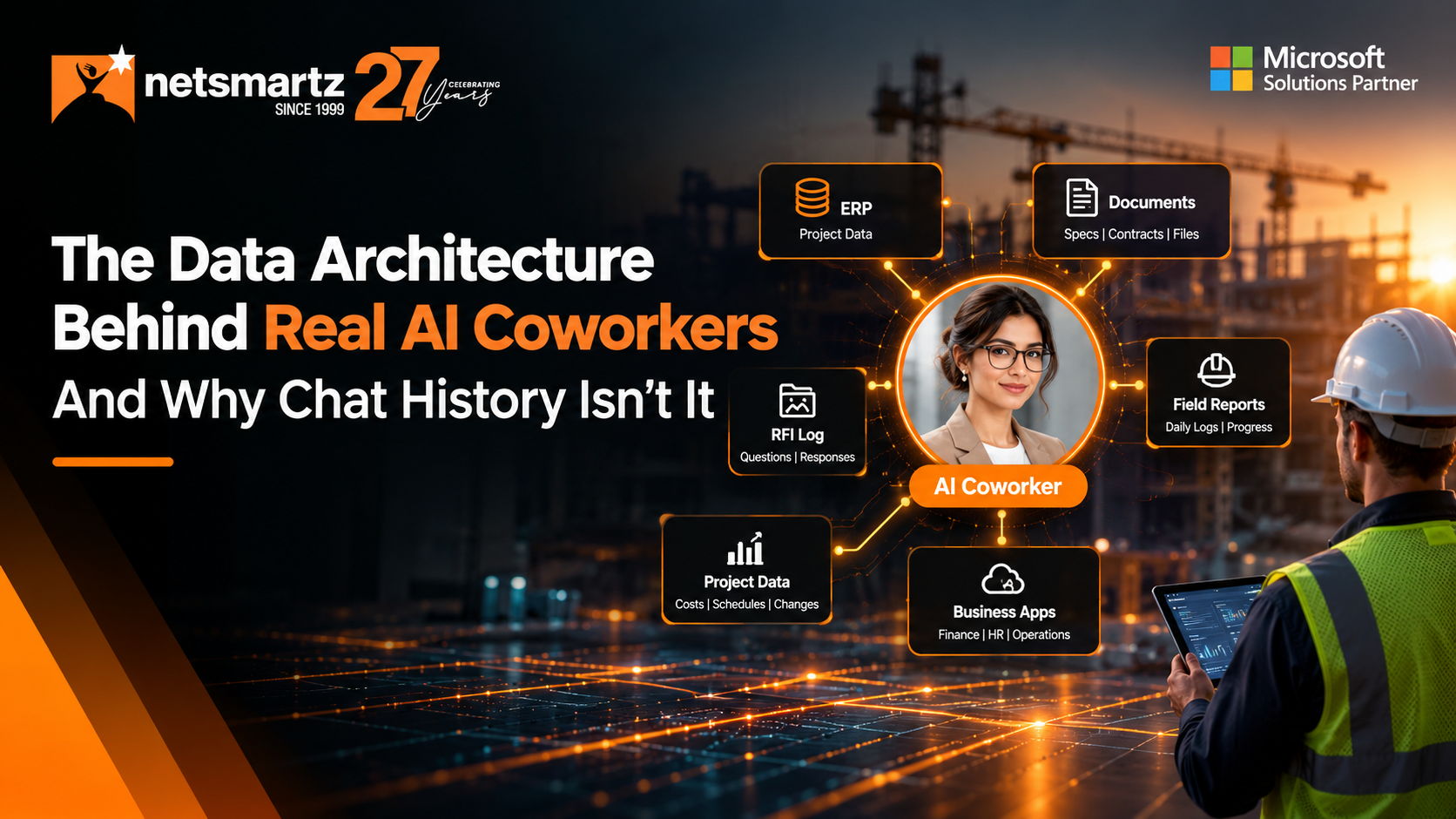
Picture a project manager asking an AI assistant a simple question on a Thursday afternoon: “Are we still under budget on concrete for the Riverside job?”
The answer comes back in seconds. It’s clear, confident, and well written. It’s also wrong.
The AI worked from the cost report someone pasted in last week. It doesn’t know that a $48,000 change order was approved on Tuesday, that the ready-mix commitment was revised, or that the field logged two extra pours after a failed inspection. None of that was in the conversation. All of it was in the job.
That’s the problem with AI assistance only knows its chat history. It remembers what you told it. It doesn’t know what’s true on the job today.
In construction, those two things can drift apart quickly. An AI coworker needs access to the right job-level information to do its assigned work with current context.
Our view at Netsmartz is simple: an AI coworker is only as useful as the job information it can access. Not just the conversation, but the job itself: its cost codes, commitments, change orders, RFIs, and field records, current as of today.
Quick answer
Job-level data is the structured record of a construction project, organized around the job number: budget and cost codes, commitments, change orders, RFIs, submittals, schedule, daily logs, and labor. Chat history only holds what someone typed or pasted into a conversation. AI coworkers need job-level data because construction decisions depend on what is current and approved on the job, not on what was discussed last week.
Chat History Remembers the Conversation. The Job Lives in Your Systems.
AI is already in the construction office. In AGC and Sage’s 2026 Construction Hiring and Business Outlook, a survey of 951 firms, 45% said they use AI for office and administrative functions. The question is no longer whether contractors use AI, it’s what that AI knows.
Chat-based assistants are built around a conversation. They work with what you paste in, and some remember your preferences between sessions. That’s useful for drafting an email or summarizing a spec section.
But a construction job isn’t a conversation. It’s thousands of connected records that change every day, tied together by a job number and cost codes.
| The PM asks… | AI with chat history only | AI coworker with job-level data |
|---|---|---|
| “Are we over budget on concrete?” | Works from whatever cost report was pasted in last | Budget, committed, and actual cost by cost code, including approved change orders, as of today |
| “What’s holding up the steel package?” | Summarizes the email thread you shared | Submittal status, open RFIs, and the schedule activity they’re holding up |
| “Can we bill for this month’s progress?” | Drafts something from your description | Percent complete from daily logs, the schedule of values, and approved change orders |
| “Which subs are behind on paperwork?” | Nothing, unless someone pastes in a list | Missing lien waivers and unsigned commitments, by job and by sub |
Why “Almost Right” Is the Most Expensive Answer in Construction
Construction data goes stale fast. A cost report is out of date the moment a change order is approved. A schedule shifts with every weather day. A commitment changes when a sub’s scope is revised.
An AI answer that’s obviously wrong is easy to catch. The dangerous one is fluent, specific, and a week old. It sounds like it came from your system, but it actually came from a conversation.
Teams already lose real time chasing current information. Procore’s Future State of Construction report (April 2025), a survey of more than 1,200 construction decisionmakers, found that 18% of project time is lost searching for data.
An AI that works from pasted-in context doesn’t remove that search. It just moves it. Someone still has to find the right report, confirm it’s current, and paste it in before the AI can help. That’s why job-level data isn’t a technical preference. It decides whether an AI coworker removes the search or adds another step to it.
One Question, Two Answers: Approving a Subcontractor Pay App
Here’s how the difference plays out in a workflow every contractor knows. A drywall subcontractor submits a pay application, and the PM asks: “Can we approve this one?”
An AI working from chat history reads the pay app PDF you uploaded and confirms the math adds up. The totals are right. That’s all it can check.
An AI coworker working from job-level data checks the pay app against the job before the PM looks at it:
- Billed vs. committed: Is the sub billing within their commitment, including approved change orders?
- Claimed progress vs. the field: Does the percent complete line up with what the daily logs show on site?
- Retainage: Is it calculated at the contract rate?
- Paperwork: Is the lien waiver from the last payment on file?
- Open issues: Are there pending back-charges or unresolved change orders against this commitment?
Then it gives the PM a short summary: what matches, what doesn’t, and what needs a decision.
The PM still approves the payment. The difference is that the AI coworker has already checked the pay app against the job’s commitments, field progress, retainage, paperwork, and open issues. The PM gets the context needed to make the decision without pulling that information together manually.
That’s the difference between AI that reads a document and an AI coworker that works from job-level context.
The Netsmartz View: Your Job Data Structure is Your AI Strategy
Here’s the part most AI conversations skip. Every contractor can buy access to the same AI models. What nobody can buy is a clean, connected record of your own jobs. That’s where the advantage sits.
Gartner predicts that through 2026, organizations will abandon 60% of AI projects that aren’t supported by AI-ready data. Construction is running into the same wall. In the RICS AI in Commercial Property and Construction Report 2026 (August 2026), only 19% of construction respondents said they use AI regularly in specific processes, and lack of integration capability was one of the top barriers, behind a shortage of skilled people.
The constraint has shifted. The AI is ready. The real question is whether it can reach the job.
That's why Netsmartz starts with the job data, not the chatbot. An AI coworker needs a clean, organized job record: consistent job numbers, cost codes that mean the same thing on every project, and commitments, change orders, and field updates tied to the right job with a clear status.
If your job data already lives in a well-structured system, the work is modernizing and connecting what you have. If it's spread across spreadsheets, email, and disconnected tools, ProjectPro, our AI-powered construction ERP built on Microsoft Dynamics 365 Business Central, gives you that structure from day one. It keeps jobs, cost codes, commitments, change orders, and job costing in one connected record, and ProjectPro Field brings site data into the same record.
Either way, once that foundation is in place, our AI coworkers can work from the job record itself. When a PM asks about a job, the answer starts from what's current and approved, not from what was pasted into a chat.
Five Questions to Ask Before You Trust an AI Coworker with a Job
Whether you’re evaluating a vendor or checking your own readiness, these questions separate an AI coworker that knows the job from one that only knows the chat.
If the answer to any of these is no, the AI may still be a useful tool. It just isn’t ready to be trusted with a job.
The Bottom Line
Chat history makes AI a good assistant. Job-level data makes it a useful AI coworker. In construction, where the numbers change daily and a wrong answer lands on a real project, only one of those is worth handing work to.
See how 20+ AI coworkers work from your job data, not a chat window. Book a walkthrough.
Frequently Asked Questions
Job-level data is the structured record of a construction project, organized around the job number. It includes the budget and cost codes, commitments, change orders, RFIs, submittals, schedule, daily logs, and labor hours, along with the status of each item (approved, pending, or rejected).
Chat history only contains what someone typed or pasted into a conversation, and it goes out of date as soon as the job changes. Construction decisions depend on current, approved figures such as committed costs and change order status, which live in project and accounting systems, not in a chat.
Document search finds text. It can tell you what a change order says, but not whether it’s approved, which cost code it hits, or what it does to the forecast. An AI coworker working from job-level data understands those relationships, so it can answer questions about the state of the job, not just the contents of a file.
No. Start by making sure the core of the job record is consistent: job numbers, cost codes, commitments, and change orders. An AI coworker working from that structure will quickly show you where the remaining gaps are, which is useful in itself.
An AI coworker should follow the same role-based permissions as your ERP and project systems. A superintendent shouldn’t see margin data through an AI that they can’t see in the system itself. Test this directly when you evaluate any AI coworker.
Keep reading

Ready to build smarter? Let's talk.
Our experts are ready to help you turn ideas into production-ready AI, cloud and digital solutions.
Get In Touch →Let's Discuss Your Growth Strategy
Let's discuss how we can help you accelerate growth, improve efficiency, and drive real business outcomes.