 AI-First Culture
Accounts Payable Automation Software and the 34-Point Gap in Who Gets Paid on Time in Construction
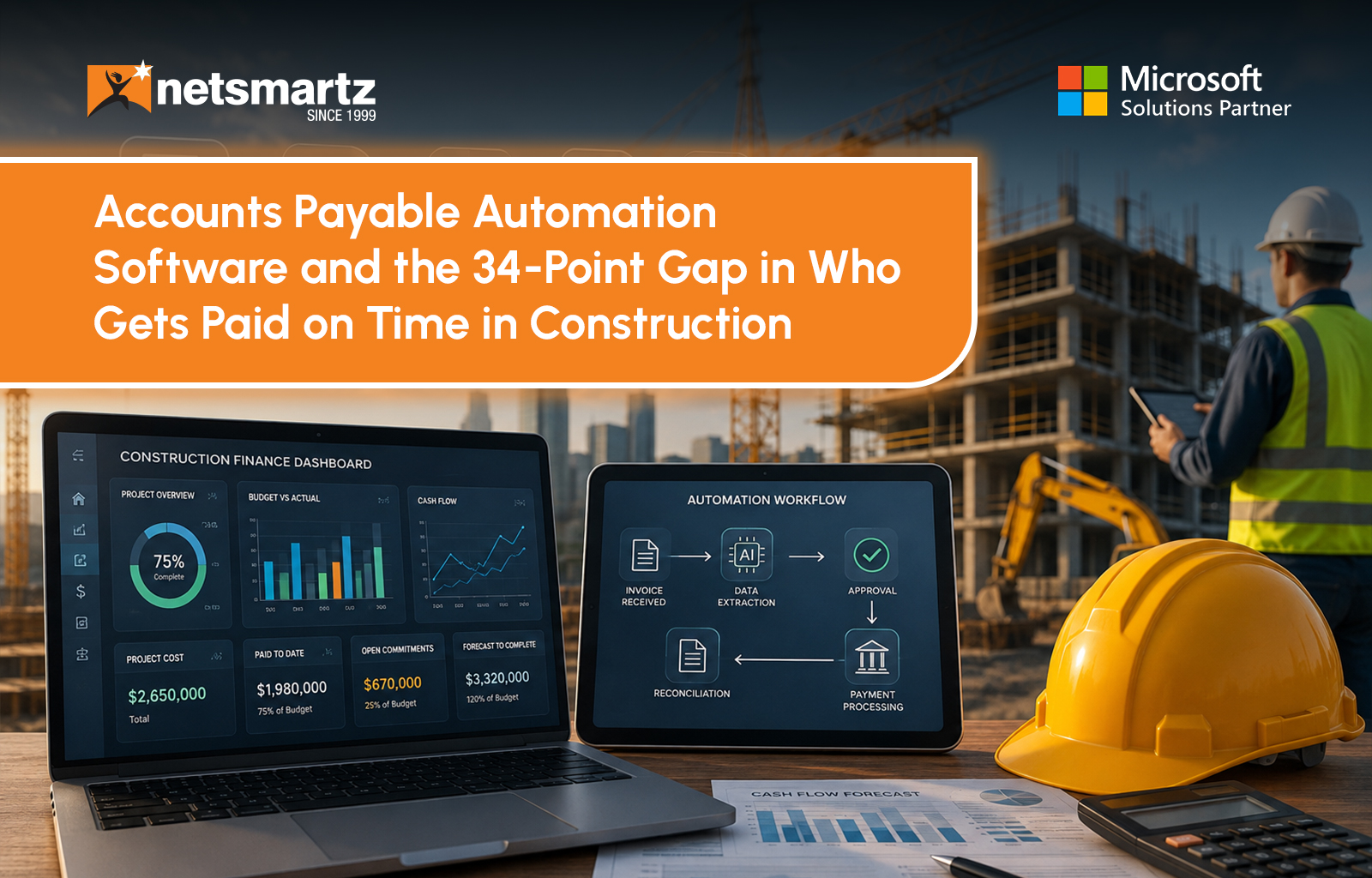
Pay Application #7 lands in the accounts payable queue for $340,000. There is no purchase order attached to it, because subcontract billing does not use one. It refers to a schedule of values with 42 line items, each one billed at a different percentage completely. Retainage on this application runs 5%, so $17,000 of that $340,000 is not payable at all yet, and will not be until the contract reaches substantial completion. The finance team cannot cut a check regardless of what the invoice-matching engine decides, because the subcontractor's lien waiver has not come back.
Most accounts payable automation software has exactly one question for a line item like this: does the amount match a purchase order? There is no purchase order, so the software stalls, someone re-keys the application into a spreadsheet by hand, and the payment clock the subcontractor is watching keeps running anyway. This is not a bug in the software. It is what happens when a tool built to approve and pay a vendor invoice in one motion meets a document that was never an invoice to begin with.
Construction finance teams usually buy accounts payable automation software for a real reason: it works, on the invoices it was designed for. The trouble starts the first time a subcontractor pay application shows up, and the system tries to process it the same way.
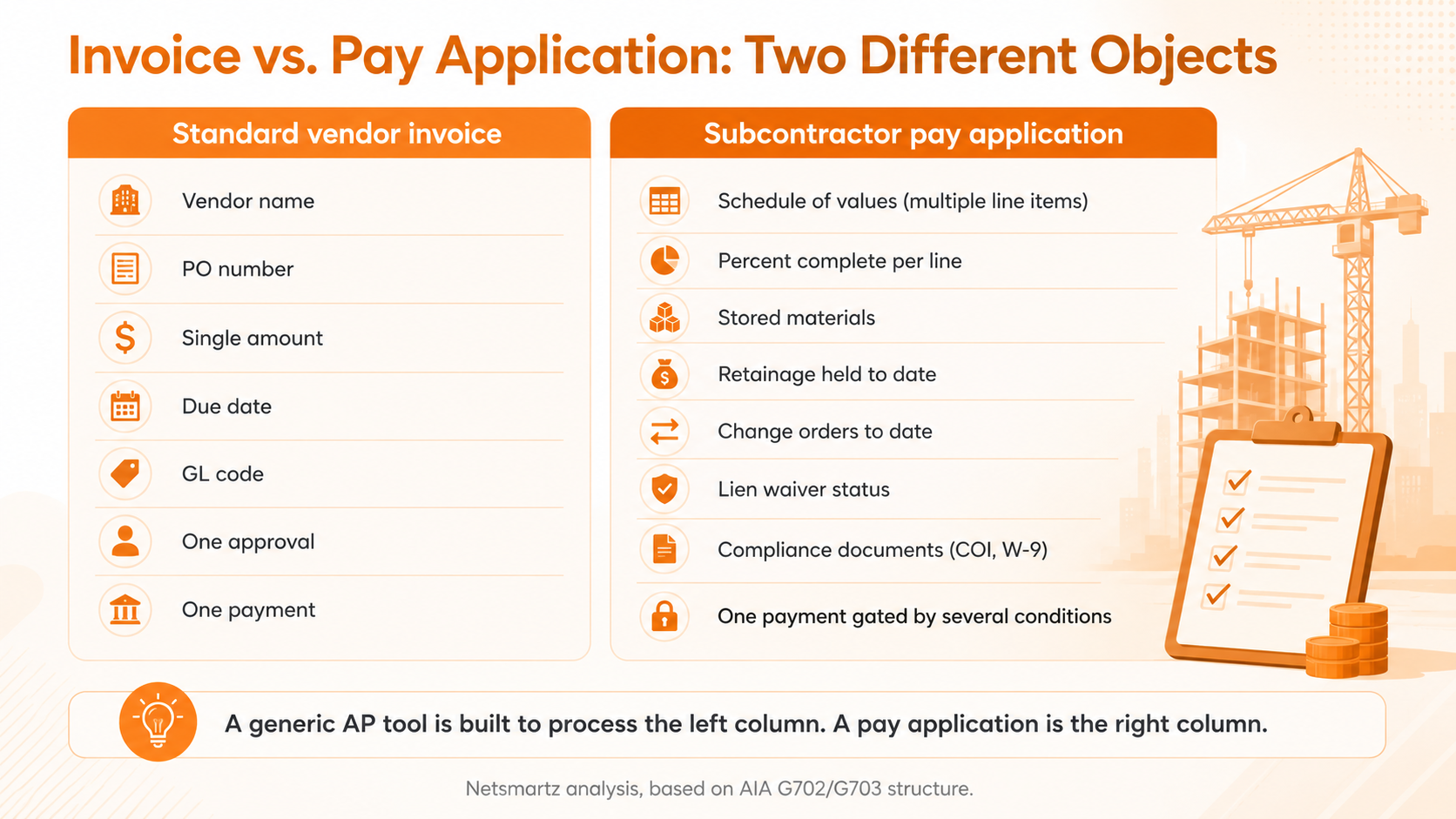
What a subcontractor pay application actually is
Most commercial construction contracts bill through the AIA G702 Application and Certificate for Payment, paired with the G703 Continuation Sheet as its schedule of values. Instead of one amount for one delivery, the subcontractor breaks the entire contract into line items, such as sitework, framing, or rough-in electrical, and bills each one by percentage complete for that period. A single pay application might carry 20-to-50-line items, each moving independently: framing at 80% one month, sitework finally closing out at 100%, a new line-item appearing because a change order was approved last week.
Retainage sits on top of every one of those line items, not on the invoice as a whole. A generic AP platform that treats retainage as a flat discount on the total, if it has any concept of retainage at all, will get the math wrong the moment two-line items are held at different percentages, which happens often once a contract passes its halfway point and some states require the retainage rate to step down.
Where construction accounts payable breaks the moment automation gets involved
A standard AP workflow is a straight line: invoice arrives, invoice is matched to a purchase order, invoice is approved, invoice is paid. A subcontractor pay application runs through gates that a three-step workflow was never built to hold.
The four lien waivers a pay application depends on
Lien waivers come in four versions, built from two choices. Conditional waivers only take effect once payment clears the bank. Unconditional waivers take effect the moment they are signed, whether payment has cleared or not. Progress waivers cover one billing period. Final waivers give up all remaining lien rights on the project. The safe sequence is to collect a conditional waiver before payment goes out, then collect the unconditional version only after the payment has cleared, because signing an unconditional waiver for a check that later bounces gives away lien rights for money the subcontractor never received. A generic AP tool has no field for waiver type, no way to hold a payment open until the right one arrives, and no way to flag that a lower-tier supplier's waiver is still missing from the chain.
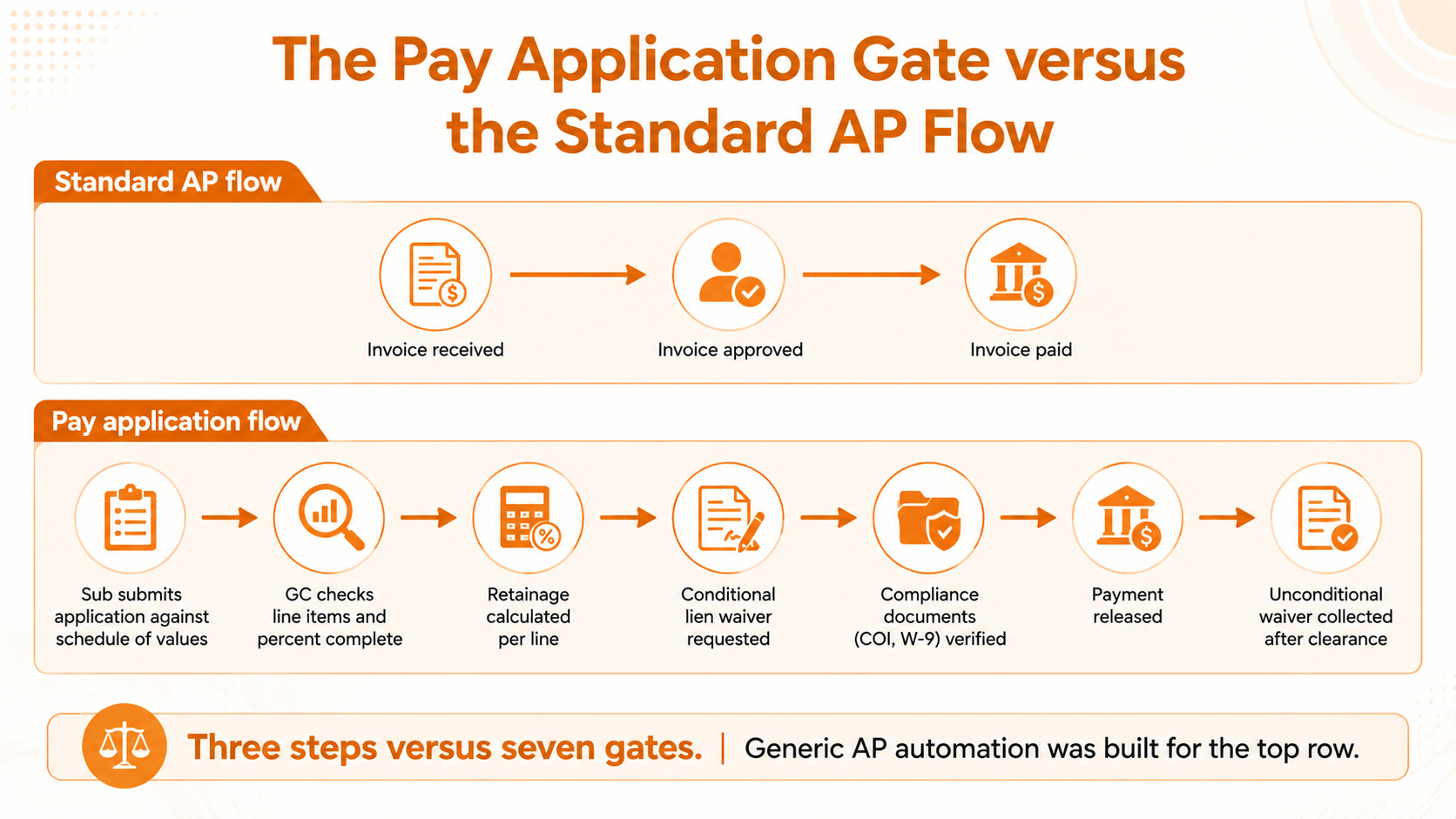
Compliance documents add a second gate. Before payment releases, most GCs require a current certificate of insurance and a signed W-9 on file for that subcontractor. Certificates of insurance expire, often mid-project, and a payment that goes out against an expired COI can void coverage exactly when a claim shows up. None of this is invoice data. It lives on the vendor record, not the transaction, which is precisely where most AP automation software does not look.
Then there is the question of whether the money is even owed yet, independent of anything the AP system has approved. Pay-when-paid clauses delay payment until the general contractor receives funds from the owner, but still require payment within a reasonable time. Pay-if-paid clauses go further: if the owner never pays the GC, the GC may owe the subcontractor nothing at all. Eleven states, including California, Illinois, and New York, prohibit pay-if-paid clauses outright, according to Levelset's legal analysis of state contingent-payment statutes, and several others enforce them only when the contract language is explicit. An AP platform that only knows "approved" or "not approved" cannot encode a clause whose enforceability depends on which state the project sits in.
The 34-point gap this creates
Every manual workaround here (a side spreadsheet for retainage, an inbox thread for waivers, a sticky note for COI renewals) adds a delay, and delays compound. In Levelset's 2022 Construction Cash Flow & Payment Report, a vendor-commissioned survey of more than 500 construction companies, 58% of general contractors said they get paid within 30 days on average, compared with just 24% of subcontractors: general contractors were roughly four times more likely to report always getting paid on time. Some of that gap is structural to how construction financing works. Some of it is every extra manual step a mismatched AP system forces into a process that should already be running inside it.
That gap shows up as more than a cash flow problem. It shows up as disputed applications, subcontractors who pad future bids to cover the float, and finance teams who spend their close cycle reconciling a spreadsheet instead of reviewing exceptions their software should have caught on its own. The gap is recognized widely enough that entire platforms exist to manage just the payment piece: Oracle's Textura and Autodesk's GCPay, acquired from Payapps in January 2024, both built specifically to process construction payment applications, because the AP automation already sitting in most back offices could not.
Why the fix starts with the subcontract, not another approval layer
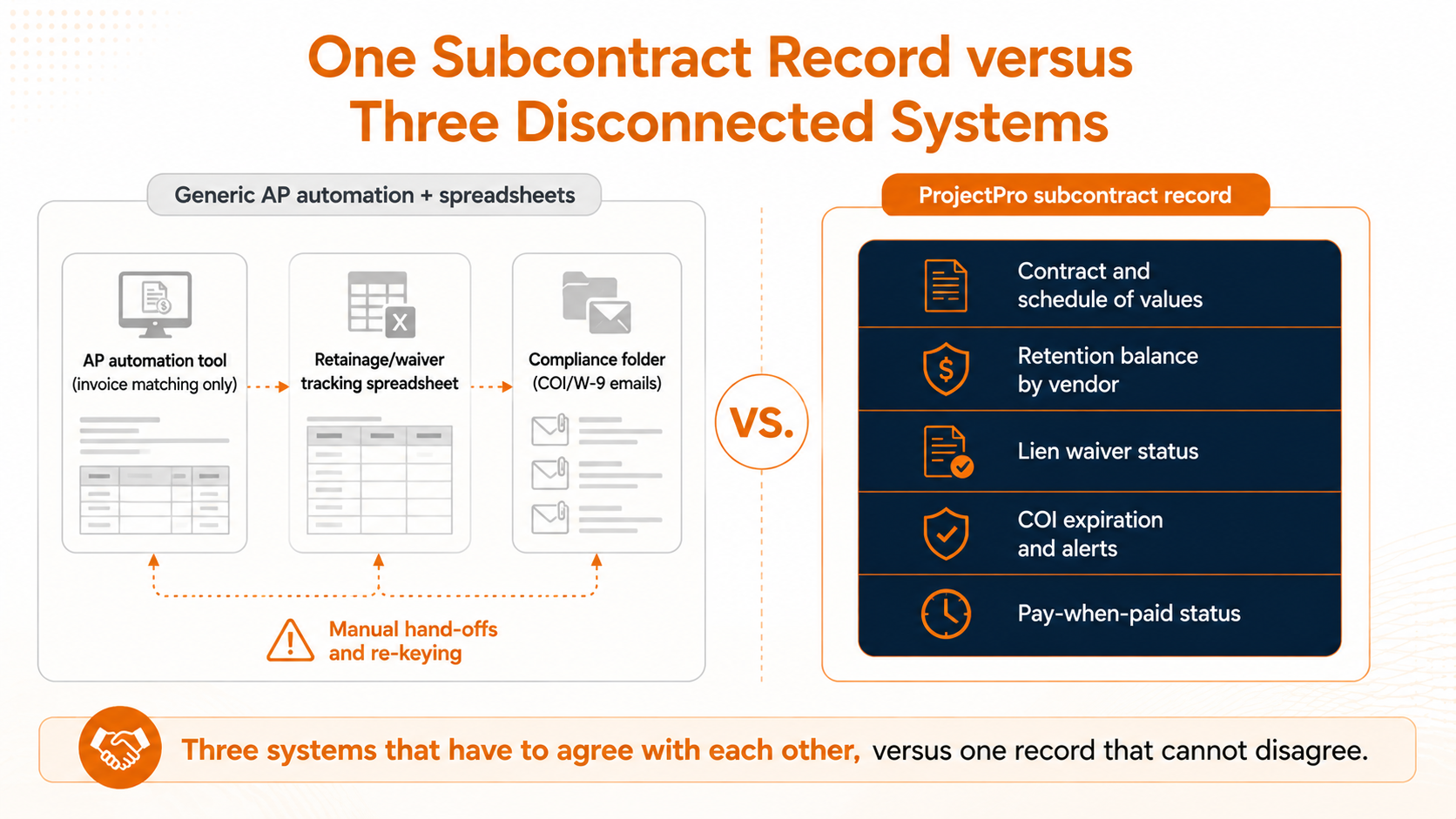
Bolting a waiver tracker or a compliance checklist onto a generic AP tool treats the symptoms. The actual gap is that the tool's system of record is an invoice, and a pay application was never an invoice. Fixing it means the subcontract itself has to be the record the financial system tracks, with retainage, lien waivers, and compliance status living on it as native fields rather than as attachments someone has to remember to check.
This is the part of construction accounts payable that a construction-native ERP is built around, and it's why Netsmartz built ProjectPro, its construction ERP, directly on Microsoft Dynamics 365 Business Central rather than layering AP automation on top of a generic ledger. Netsmartz continued that work after acquiring Gemko's Microsoft Dynamics practice and the ProjectPro product, building on more than a decade of production history in construction billing rather than starting from a general-purpose chart of accounts. On a ProjectPro subcontract record, retention balances are tracked by vendor, lien release waivers are managed on the same record as the contract, certificates of insurance carry their own expiration dates with automatic alerts before they lapse and pay-when-paid clauses are a property of the subcontract rather than a manual hold someone sets and has to remember to lift. None of that is a workaround layered over accounts payable. It is what the subcontract record already contains, because the system was built for construction billing from the first release, not adapted afterward.
What to check before your next AP automation purchase
Ask whether the tool can bill against a schedule of values with percent-complete line items, not only match a total to a purchase order. If the demo cannot show a partial completion pay application, it cannot handle a real one.
Ask how retainage is tracked. It should hold a balance per line item, across every application on that contract, until a defined release event, not apply a flat percentage to an invoice total.
Ask what happens when a lien waiver or a certificate of insurance is missing. The system should be able to hold the payment and tell you exactly what is outstanding, rather than approving the amount and leaving compliance to a separate checklist.
The real fix is a different system of record, not a smarter approval queue
Construction accounts payable works when the subcontract, not the invoice, is the thing the system actually tracks. That is the difference between accounts payable automation solutions built for general business and a construction ERP like ProjectPro, built on Microsoft Dynamics 365 Business Central specifically to carry retainage, lien waivers, and compliance documents on the record where the payment decision gets made.
Request a ProjectPro walkthrough of subcontractor pay application processing, built on Business Central, and see your own schedule of values run through it. →
Frequently Asked Questions
A subcontractor pay application is a periodic billing document, typically formatted on AIA forms G702 and G703, that requests payment against a schedule of values rather than a single invoice amount. It breaks the contract into line items, bills each by percentage complete for that period, and factors in retainage, prior payments, and any approved change orders before arriving at the amount currently due.
Most accounts payable automation software is built to match a vendor invoice to a purchase order and push it through a single approval before payment. A pay application has no purchase order, bills multiple line items at different completion percentages, withholds retainage per line, and requires lien waivers and current compliance documents before payment can release. A tool designed around one invoice and one approval has no field for any of that.
Pay-when-paid only controls timing: the general contractor must still eventually pay the subcontractor, even if the project owner never pays the GC, typically within a reasonable time. Pay-if-paid shifts the risk itself: if the owner never pays the GC, the GC may have no obligation to pay the subcontractor at all. Eleven states currently prohibit pay-if-paid clauses outright, and several more only enforce them when the contract spells out the risk-shifting language explicitly.
Add-on tools can track individual pieces (a waiver tracker here, a COI monitor there) but they still sit outside the system that actually approves and releases payment, which means someone still has to reconcile the two manually. The more durable fix is an accounts payable process built on a system that treats the subcontract itself as the record, so retainage, waivers, and compliance status live next to the payment decision instead of beside it.
Retainage is calculated per line item on the schedule of values, not once against the total invoice, and the withheld balance accumulates across every application submitted on that contract until a release event, such as substantial completion or a contract milestone. Many contracts step the retainage rate down, commonly from 10% to 5%, once the project passes the halfway point.
Keep reading

Business Central Features for CFOs: Are You Using What You Already Have?
Business Central MCP Server: Why Construction's Biggest AI Use Case Is the Back Office
Breaking Down Dynamics 365 Business Central Essentials, Premium, and Team Members Licensing
Ready to build smarter? Let's talk.
Our experts are ready to help you turn ideas into production-ready AI, cloud and digital solutions.
Get In Touch →Let's Discuss Your Growth Strategy
Let's discuss how we can help you accelerate growth, improve efficiency, and drive real business outcomes.