 AI-First Culture
Dynamics AX Upgrade Timeline: What a 2027 Go-Live Takes
Most UAE finance teams lock next year's capital spend in December. For anyone still running Dynamics AX, that makes this month the deadline that matters, not a date Microsoft published years ago.
The Dynamics AX upgrade timeline is simple enough to work out on the back of a page. A mid-size move to F&O (Dynamics 365 Finance and Operations) runs six to twelve months once the work starts. Partners across the region are booking three to six months out, so approval and kickoff are not the same day. Approve in December and a 2027 go-live is realistic. Miss this round, wait for December 2027, and you are looking at 2029.
Here is where each AX version stands, how those months get spent, what moves the date in either direction, and what to have in hand before you ask for budget.
Dynamics AX end of support: where your version stands
There is no countdown left to run. Every release of Dynamics AX is already past its support dates, so this is a statement about today rather than a warning about next year.
| Version | Mainstream support | Extended support ended |
|---|---|---|
| AX 2009 SP1 | Ended | 12 April 2022 |
| AX 2012 | Ended | 12 April 2022 |
| AX 2012 R2 | Ended | 12 April 2022 |
| AX 2012 R3 | Ended | 10 January 2023 |
No version on that list receives security patches. Security patching is the headline, but the detail finance teams miss is that Microsoft also stopped shipping regulatory and tax updates, which is a separate problem with a separate owner. Any change in reporting requirements is now your team's build, not a download. The exposure runs wider than the ERP too, because the Windows Server and SQL Server versions a typical AX estate depends on have aged out on roughly the same schedule.
For the risk side of the conversation, IBM put the average cost of a data breach in the Middle East at $8 million in 2026, with UAE organizations in the sample. Cyber insurers have also been tightening their wording around end-of-life software. Whether that touches a specific policy is a question for your broker, but it is worth checking before renewal.
The Dynamics AX upgrade timeline: how long the move takes
Six to twelve months is the honest range for a mid-to-large estate, measured from project start to go-live. Where a given project lands inside it comes down to code, integrations and data quality, roughly in that order.
The work breaks into phases that overlap more than any neat chart suggests:
Assessment and scoping
Code and customization review
Data migration design
Build and configuration
Testing
Cut-over and hypercare
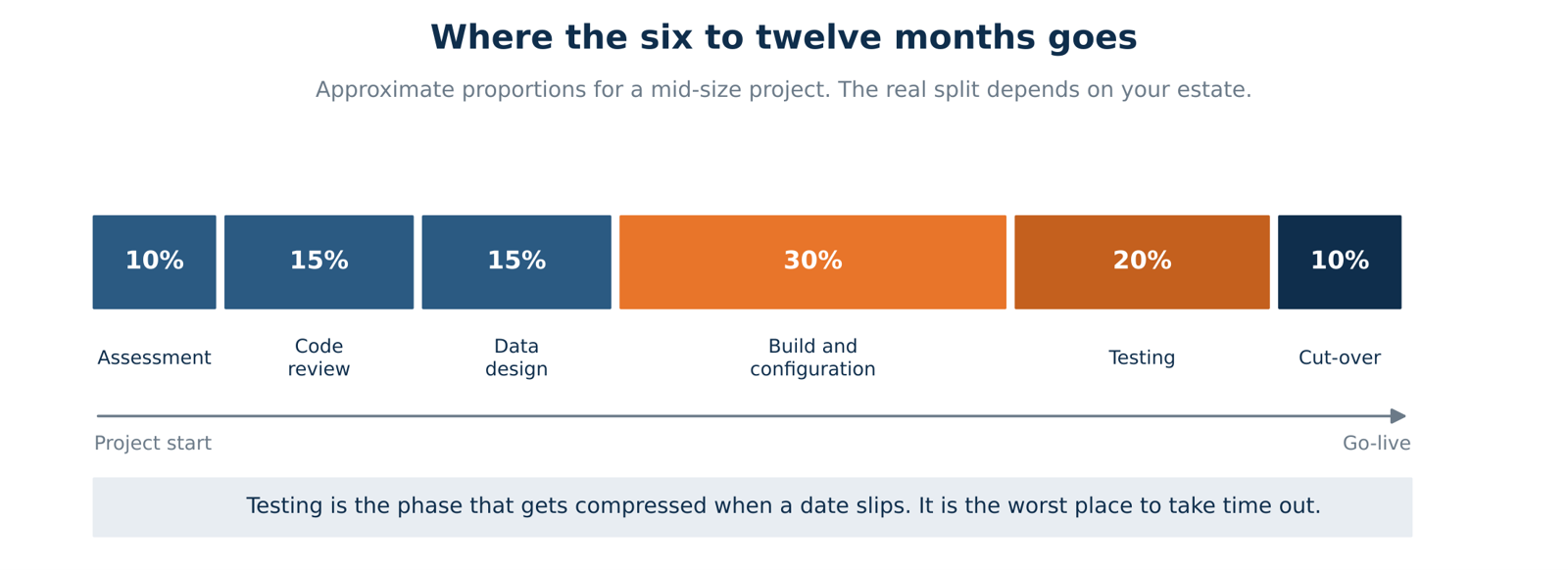
Approximate proportions only. The split shifts with the estate.
Proportions are more useful here than invented week counts, because the split shifts with the estate. Build and configuration is normally the largest block. Testing is second, and it is the phase that gets compressed when a date starts to slip, which is the worst possible place to take time out. Assessment is short in calendar terms and decides a disproportionate amount of what follows it.
Then there is the part that rarely makes it into the plan: securing a partner. Delivery teams in the region are booking three to six months ahead. A December approval does not buy you a January start. It buys you a place in a queue.
What shortens the timeline
Customizations that turn out to be standard functionality now. A fair amount of what was built into AX in 2013 ships in the product today. VAT reporting, multi-level approval workflows and consolidation across legal entities are the familiar examples. Every one you retire instead of rebuilding comes straight off the critical path.
An integration map someone can actually read. Not the diagram from the original implementation. A current list of what talks to AX, in which direction, how often, and who owns the thing at the other end.
An early, specific decision about historical data. “All of it” is a decision too, and an expensive one. Most finance teams need open items, balances and a defined number of closed years, not every transaction since 2011.
Being on AX 2012 R2 or R3. Microsoft supports a direct code upgrade from those two releases, so custom code moves forward with tooling behind it rather than being rewritten from a blank file.
What stretches it
Undocumented integrations. The feed nobody can describe is the one that surfaces in week six of testing, and it usually belongs to a bank, a customs portal or a payroll bureau working to its own calendar rather than yours.
Customizations nobody will sign off retiring. Normally because the person who requested them in 2014 has left, and nobody currently in the room wants to be the one who deleted something.
Data quality discovered late. A duplicate vendor table and an unreconciled subledger are a two-week problem in month two. In month nine they are a go-live blocker.
A cut-over scheduled across a quarter close, an audit window or a peak operating period. The calendar costs nothing to check early and a great deal to fix late.
The AX 2009 complication
If you are on AX 2009 or AX 4.0, your road is longer than it is for the company next door, and that is worth knowing now rather than in March.
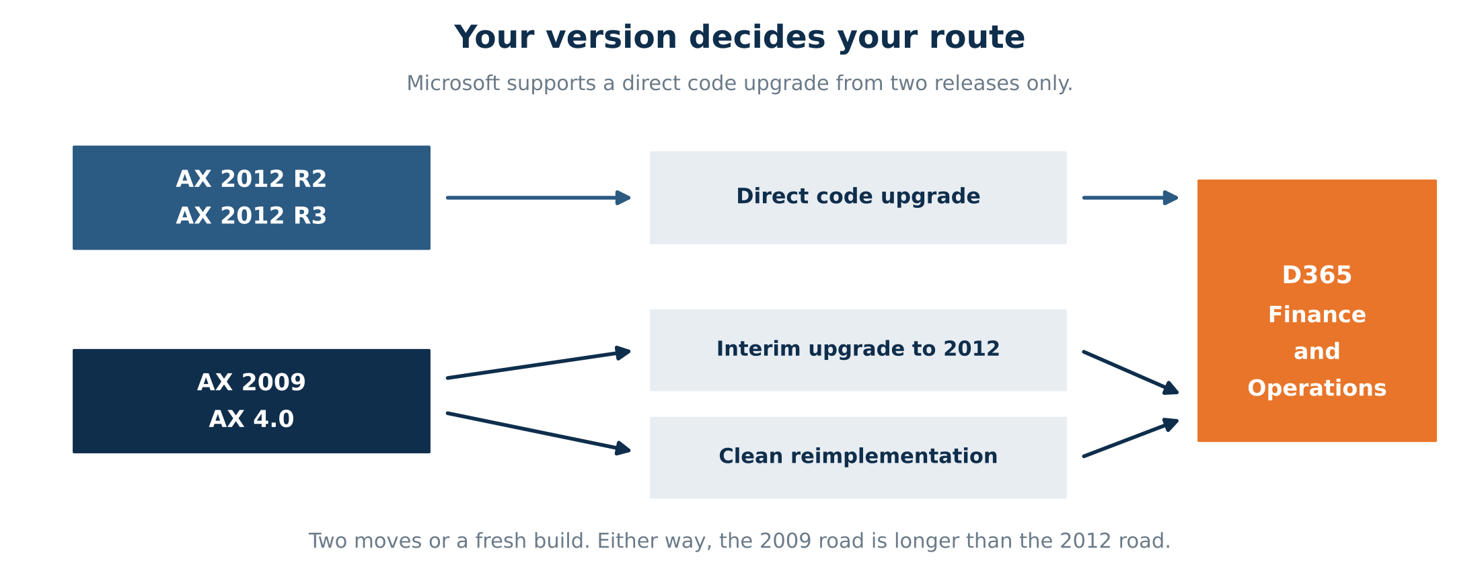
Microsoft's direct code upgrade path covers AX 2012 R2 and R3 only. From AX 2009 or AX 4.0 there are two routes: an interim upgrade to AX 2012 first, which means paying for two moves, or a clean reimplementation on F&O.
Reimplementation is not the consolation prize. It is often quicker than a double upgrade, and it clears out fifteen years of accumulated customization in one pass. It is a different project with a different shape of effort, though, and it tolerates a late start even less.
What a Dynamics AX upgrade costs
You will not find a figure on this page, because any number we published would be wrong for most readers. Five things move the budget: how many customizations survive the fit-gap review, how many integrations need rebuilding rather than repointing, how much history moves across, how many legal entities and countries are in scope, and the licensing position you start from. Two companies on the same AX 2012 R3 build can sit a long way apart on all five. What is predictable is the direction. Waiting does not shrink the number.
Working backwards from a go-live date
This is the arithmetic that matters, and it runs in one direction only.
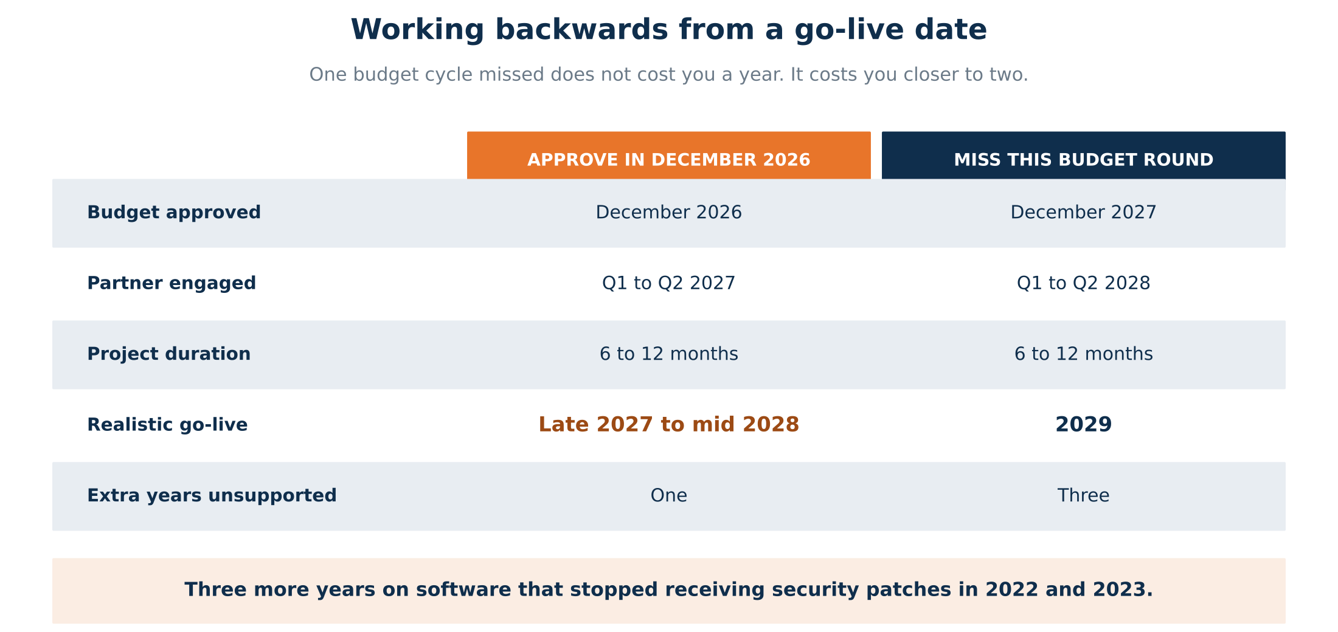
A twelve-month slip in approval does not produce a twelve-month slip in go-live. It produces something closer to two years, because the budget cycle and the partner queue each come around only once.
What to have ready before you ask for budget
None of this needs a consultant. Six items, most of them collectable in an afternoon:
Your AX version and build number. Not “AX 2012”. The build, which your IT team can read off the environment in a minute.
The modules actually in use. Used, not licensed. The gap between the two is often large and always informative.
A rough count of customizations. “Around forty, maybe a dozen we would fight for” is a perfectly good answer at this stage.
A list of integrations with a named owner against each one. The names are the point. An integration without an owner is a risk, not an interface.
Your current licensing position. What you hold, under which agreement, and when it renews.
Who signs off on retiring custom functionality. The hardest item here, and the one that quietly decides whether your timeline holds.
Answer those six in a single email and any competent partner can come back with a credible range inside a week. If you cannot answer them yet, the first phase of your project is finding out, which is normal enough. Better to find that out in December than in June.
Bringing it back to the budget
None of the above is an argument for rushing a Dynamics AX migration in the UAE. It is an argument for running the arithmetic in the same month the budget gets decided, rather than six months afterwards.
Our Microsoft Dynamics practice has been running since 1999, and we have 25+ Dynamics specialists based in the UAE covering Finance and Operations, Business Central, construction and CRM, with assessment, migration, licensing and ongoing support handled in-house. If you would like your own version of the table above, with your version, your customizations and your integrations in it, that is a conversation worth having before December closes.
Frequently Asked Questions
No. Extended support ended on 12 April 2022 for AX 2009 SP1, AX 2012 and AX 2012 R2, and on 10 January 2023 for AX 2012 R3. No version receives security patches, non-security hotfixes, or regulatory and tax updates.
Six to twelve months for a mid-to-large estate, from project start to go-live, plus three to six months at the front for partner availability.
No. Microsoft's direct code upgrade path covers AX 2012 R2 and R3 only. From AX 2009 or AX 4.0 you need either an interim upgrade to AX 2012 or a clean reimplementation on F&O.
Some of them, deliberately. A fit-gap review sets every customization against current standard functionality, and a good share of what was custom in AX is standard today. Whatever stays genuinely specific to your business moves forward.
A scoping assessment that produces a version-specific timeline and effort estimate. The six items above are what make it fast rather than exploratory.
Keep reading

UAE E-Invoicing for Dynamics 365 F&O: The Provider Decision Comes Before the Connector

Why 70% of ERP Implementations Fall Short and How Your Partner Selection Fixes It
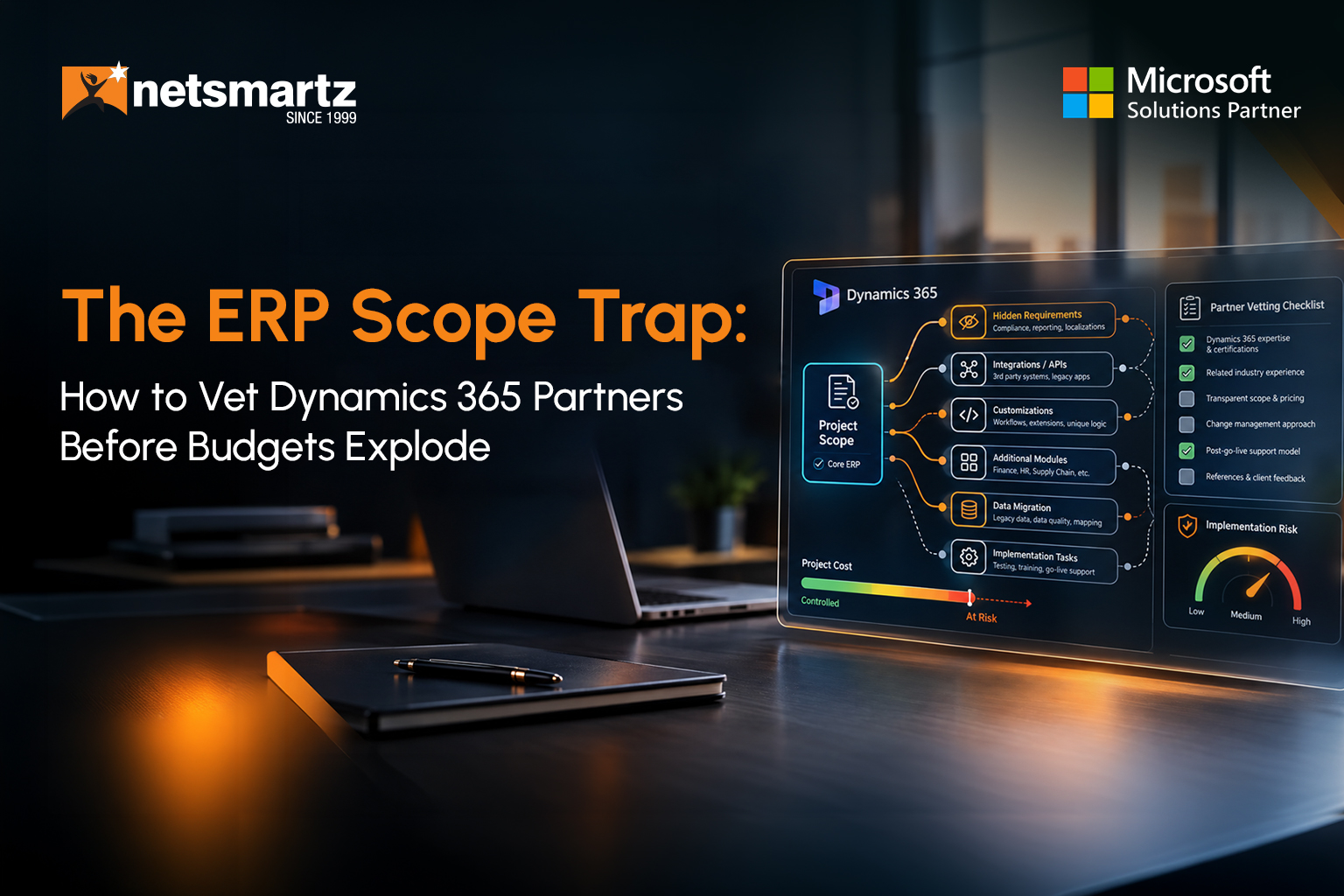
The ERP Scope Trap: How to Vet Dynamics 365 Partners Before Budgets Explod
Ready to build smarter? Let's talk.
Our experts are ready to help you turn ideas into production-ready AI, cloud and digital solutions.
Get In Touch →Let's Discuss Your Growth Strategy
Let's discuss how we can help you accelerate growth, improve efficiency, and drive real business outcomes.