 AI-First Culture
Dynamics GP Has an Expiration Date: How Decision-Makers Should Plan for Cloud ERP
It’s the last week of the 3rd quarter. Your CFO wants margin by product line. Your sales head wants to launch in a new state. Your warehouse lead wants barcode scanning. Your IT manager’s answer to all three is the same: “Not until after the server upgrade.”
That delay is the bigger problem with an aging on-premises ERP. The software may still handle today’s transactions, while every significant change takes longer than the business can afford.
The real question for decision-makers is simple: Can your current ERP keep changing as quickly as your business?
That is the real case for cloud ERP. It shortens the time between a business decision and putting that decision into operation. Microsoft Dynamics 365 Business Central supports that model through cloud delivery, connected business applications, ongoing updates, and Microsoft 365 integration.
Cloud ERP is Changing the ERP Modernization Conversation
Microsoft says more than 60,000 companies trust Business Central. That makes it an established cloud ERP option for small and midsize businesses evaluating their next ERP platform.
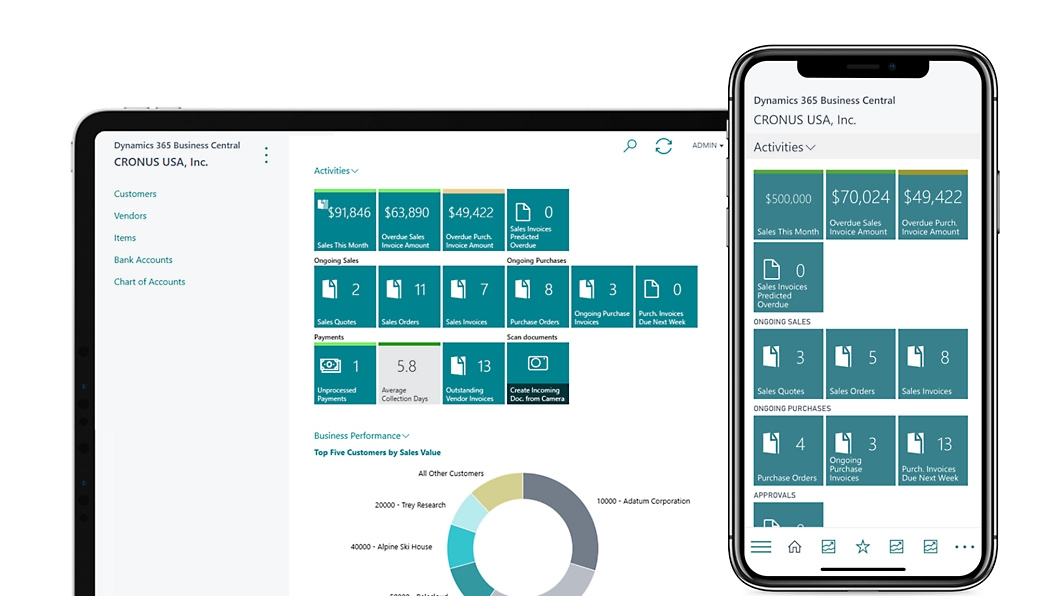
For decision-makers, the more important question is what happens after implementation.
With an on-premises ERP, infrastructure, upgrades, backups, technical dependencies, and customizations can become internal projects. Business Central online shifts the underlying infrastructure and service management to Microsoft while the organization retains responsibility for its processes, permissions, integrations, testing, and ERP strategy.
That gives companies more room to respond when the business changes. The ERP should support the pace of the business instead of setting it.
The Real Cost of an ERP That Can’t Change Quickly
The cost of an on-premises ERP is easy to find on an IT budget. Servers, infrastructure, support, upgrades, and technical resources all carry visible costs.
The harder cost is the delay around change.
A new workflow might require customization, review, development, compatibility testing, and coordination with an upgrade window. A new integration can introduce another dependency. Over time, teams start postponing changes because the effort around the ERP becomes part of the decision.
Business Central online follows a continuous service model. Microsoft delivers major updates twice a year and minor updates monthly through its managed service process. It also uses an extension-based architecture that separates custom functionality from the base application, making customizations easier to manage as the platform evolves.
Cloud ERP does not eliminate testing or governance. It changes where the effort goes. IT teams spend less time maintaining ERP infrastructure and more time managing business processes, integrations, permissions, and adoption.
For Dynamics GP Users, the Timeline is Already Set
Dynamics GP customers have a more immediate reason to evaluate their options.
Microsoft will end Dynamics GP product enhancements, regulatory and tax updates, and technical support on December 31, 2029. Security updates and patches will continue until April 30, 2031.
Microsoft has also confirmed that April 1, 2026 was the final day for new customers to license Dynamics GP subscriptions. Microsoft’s Dynamics GP migration announcement
For organizations still running GP, migration planning needs to cover more than data. Customizations, integrations, reporting, workflows, user adoption, and cutover all require decisions before implementation begins.
The deadline may be several years away. The preparation should not be.
What Cloud ERP Changes in Practice
The value of cloud ERP becomes clearer when you look at everyday decisions.
Distribution: Make Reordering Decisions with Current Inventory
A buyer managing several warehouses needs visibility into available stock, incoming orders, and inventory across locations before placing a purchase order.
Business Central brings inventory, purchasing, sales, and financial information into the ERP environment, giving buyers a shared view of the information behind a reorder decision. Microsoft also highlights inventory planning, replenishment, and warehouse capabilities within Business Central.
Manufacturing: Identify Margin Pressure Earlier
Material prices can change during the production cycle. Finance and operations need to understand how those changes affect product costs and margins before the month closes.
Business Central connects manufacturing, inventory, purchasing, costing, and financial management, giving teams a common system for reviewing the financial impact of changing production costs.
Professional Services: Reduce Billing Reconciliation
Professional services teams often have project managers approving timesheets while finance prepares invoices separately.
Connecting project, resource, time, billing, and financial information reduces the reconciliation of work between project activity and invoicing. Business Central supports project costing, timesheets, budgeting, and project profitability reporting.
Multi-Entity: Create a Repeatable Model for Growth
Adding companies through acquisitions or geographic expansion introduces new financial, reporting, tax, user, and integration requirements.
Netsmartz recently implemented Business Central Cloud for a global biosensor company operating across seven legal entities in Australia, Europe, and the US. The implementation covered core finance, intercompany trading, lot- and expiry-tracked inventory, order-to-cash, purchase-to-pay, and light manufacturing. The project went live across all seven entities with zero custom development.
This shows where a cloud ERP migration can create value beyond infrastructure. A new ERP environment can also be an opportunity to establish a cleaner, more repeatable operating model across entities.
How to Plan an On-Premises ERP Migration
A successful migration starts with understanding what the existing ERP actually does.
1. Audit Customizations Before Moving Anything
List custom reports, workflows, integrations, modifications, and extensions.
Then classify them:
Keep: still supports a critical business process.
Replace: Business Central already handles the requirements.
Redesign: the process still matters, but the old customization is unnecessarily complex.
Retire: no longer serves current business need.
This is where migration projects often uncover hidden complexity. Years of customizations can reflect old processes that nobody has challenged recently. A good audit separates genuine business requirements from historical workarounds.
2. Decide Which Data Needs to Move
Do not “move everything” the default. Identify the historical information required for daily operations, reporting, audit, and regulatory retention. Then determine what should migrate and what can be archived.
3. Plan Cutover Around the Business
Fiscal year-end may work for one company and create unnecessary risk for another. Review payroll cycles, inventory counts, seasonal demand, customer commitments, reporting periods, and major operational events before selecting the cutover date.
One common mistake is choosing a technically convenient date that falls during a critical operating period.
4. Assign Ownership After Go-Live
Cloud ERP reduces infrastructure responsibility. It does not eliminate ERP ownership. Someone still needs to review updates, test important workflows, manage permissions, monitor integrations, and decide when new capabilities should be introduced.
Cloud ERP is ultimately a decision about how quickly your business can respond to change. The right migration approach helps ensure your ERP supports that pace for the years ahead.
Is Your Business Ready for the Next Phase of Growth?
If you are evaluating a move from Dynamics GP, NAV, or another on-premises ERP, start with a Business Central Readiness Assessment.
Netsmartz can assess your current environment, identify migration priorities, review customizations and integrations, and build a practical path toward Business Central.
Frequently Asked Questions
Microsoft has set December 31, 2029, as the end of Dynamics GP product support, enhancements, regulatory updates, and technical support, with security updates and patches available until April 30, 2031.
Migration also requires customization, review, data preparation, integration work, testing, training, and cutover planning. Netsmartz can assess your GP environment and identify the work required for a Business Central migration.
The timeline depends on entities, data, customizations, integrations, reporting, and business processes. A proper estimate comes after those areas have been assessed.
Some can be rebuilt. Others may already be covered by standard Business Central capabilities. A customization audit helps determine what to retain, redesign, replace, or retire. Netsmartz can perform this assessment before implementation begins.
Security depends on identity management, permissions, role design, data protection, monitoring, and governance, as well as the underlying cloud platform. Business Central provides Microsoft-managed cloud infrastructure and security capabilities, while implementation decisions determine how users access financial data and how integrations are governed.
Netsmartz can include security, permissions, and governance considerations in a Business Central readiness review.
Look beyond subscription fees. Include infrastructure, upgrades, IT support, integrations, customization maintenance, backup and disaster recovery, implementation, and internal staff time. Netsmartz can build this side-by-side model as part of a Business Central Readiness Assessment.
Keep reading
Salesforce Agentforce Use Cases: AI Agents for Sales, Service and Business Operations

AI Platform for UAE Contractors: E-Invoicing Will Audit Your Records Before Any Agent Does

AI Agent Governance for Construction: Containment Is Not a Credit Memo
Ready to build smarter? Let's talk.
Our experts are ready to help you turn ideas into production-ready AI, cloud and digital solutions.
Get In Touch →Let's Discuss Your Growth Strategy
Let's discuss how we can help you accelerate growth, improve efficiency, and drive real business outcomes.