 AI-First Culture
Business Central MCP Server: Why Construction's Biggest AI Use Case Is the Back Office
Ask most people where AI is showing up in construction and they will describe a jobsite. Drones, progress cameras, something autonomously moving dirt.
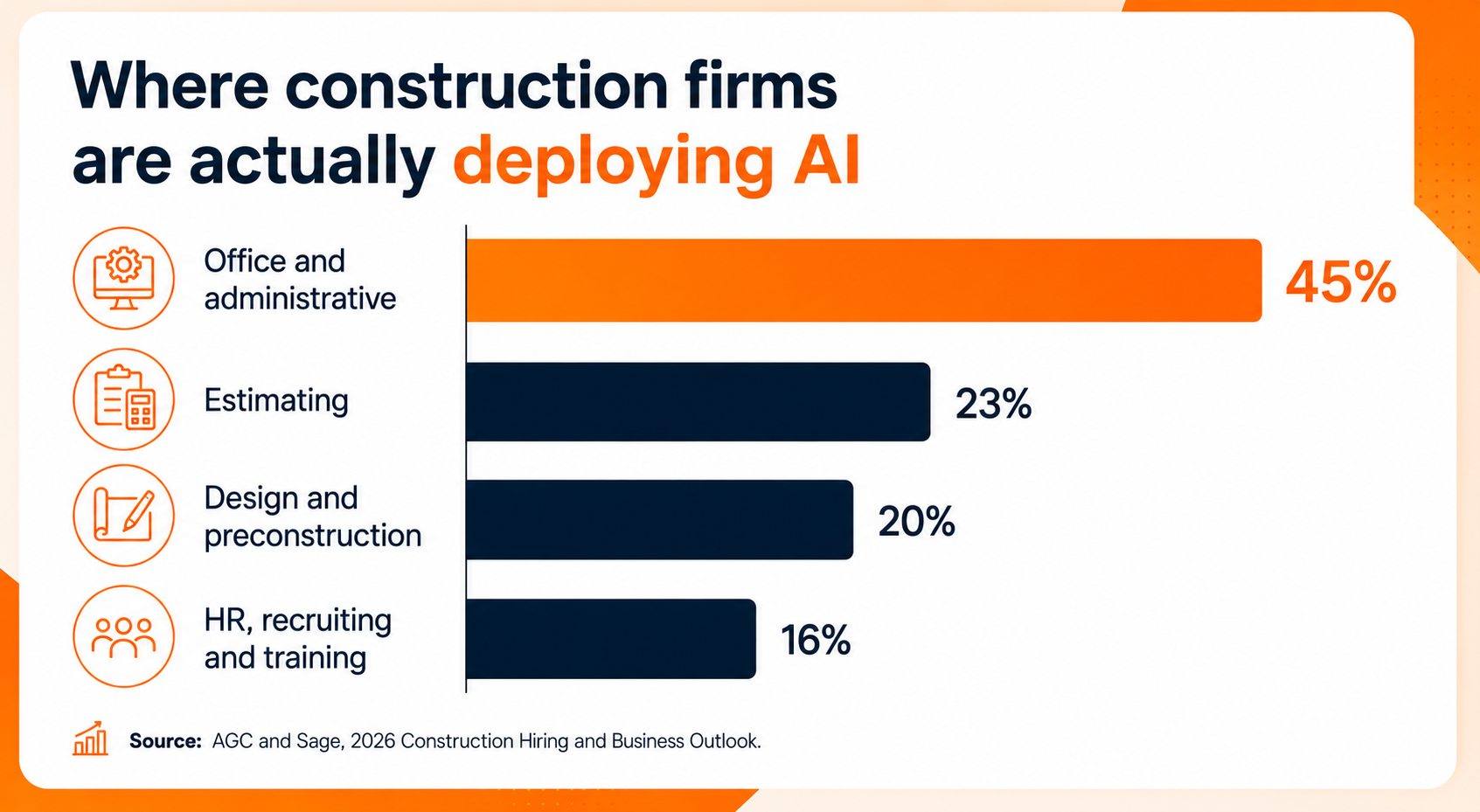
The data says otherwise. In the AGC and Sage 2026 Construction Hiring and Business Outlook, the single largest AI use case reported by contractors was office and administrative functions, at 45%. Estimating came second at 23%, design and preconstruction at 20%, HR at 16%. The same survey found 61% of firms are now using AI or planning to increase AI investment this year, up from 44% a year earlier.
So, the centre of gravity for construction AI is not the site. It is the back office, the place where your ERP already lives.
Which makes a quiet Microsoft release from last October more consequential than its coverage suggests. On 31 October 2025, Microsoft auto-enabled the Business Central MCP server in public preview across environments running 2025 release wave 2 (BC 27.1). No migration project. No middleware. If you are on that version, it is already there.
What changes, in one sentence: for roughly two decades, putting an AI layer on top of an ERP meant a budget line, an integration partner and a two-quarter calendar. Now it is an admin page inside Business Central. The binding constraint stops technical feasibility and becomes governance and data hygiene.
And for construction specifically, there is a wrinkle that matters more than any of it. The one click setup exposes standard Business Central data. Job cost, WIP and retainage are not standard Business Central data.
Preview means preview
Before anything else, a caution worth carrying into your next steering meeting. The Microsoft release plan page, updated 27 August 2026, still shows the General Availability field blank. The how to documentation carries no preview banner at all. Both cannot be right.
My read is that the documentation lags the release plan rather than the other way round. Either way, it shipped and it is not GA. Pilot it. Do not put it on the critical path for a month end close.
What MCP actually is, without the hype
Model Context Protocol is an open standard, originally released by Anthropic in November 2024. Microsoft did not invent it and does not own it.
It defines a common plug. Before MCP, connecting any AI assistant to any business system meant a bespoke integration for that specific pairing. Five assistants and four systems meant twenty projects. MCP replaces that with one interface. A business system publishes the tools it offers, and any compliant AI client can discover and call them.
That is the whole idea. It matters commercially because it turns a build decision into a configuration decision.
It is also worth calibrating the numbers you will hear. Microsoft has cited 650,000+ MCP actions across Dynamics 365. That is platform wide theoretical surface area, not what any single tenant has exposed. It is easy to hear that figure and conclude your ERP is now AI native. It is not. Yours has exactly the tools your administrator configured, which on day one is the standard set and nothing else.
What you get on day one
There is one endpoint, and the specific environment and company are selected through request headers rather than separate deployments. Nothing to stand up.
Configuration lives on a page inside Business Central and requires a dedicated MCP administrator permission set. That placement tells you something about ownership. This is a business application admin task, not an Azure or DevOps one. Your BC administrator owns it, which is either reassuring or alarming depending on how your change control works.
The default is the important part. With zero configuration, access is read only across all exposed API pages. Create, modify, delete and bound actions such as posting all require an administrator to switch them on, one API page at a time. Microsoft got this default right.
There is also an "Add All Standard APIs as Tools" button that adds every standard Business Central API page in a single click. Hold that thought.
Four settings that are really governance decisions
This is the part to walk through with your IT lead, because each of these is a business risk decision wearing a technical label.
The master write switch. When off, every creation, modification and delete permission is forced off regardless of what the per page settings say. This is your one flip lockdown, and it is the setting your auditor will ask about.
The 70-tool ceiling. Copilot Studio currently limits the agent to 70 tools. Without dynamic tool mode enabled, only the first 70 tools added are usable, which quietly undermines the "add everything" button. If someone clicked it and assumed the agent could see all of it, it cannot.
Object discovery. One toggle grants agent read access to API pages that were never explicitly added to the configuration at all. Convenient, and an escape hatch around the list you carefully curated. It deserves a deliberate yes or no.
Configuration as code. Configurations export and import as JSON, so they can be version controlled and promoted across environments like any other artifact. If you have sandbox to production discipline, use it.
What your IT team will ask, and honest answers
How does authentication work? OAuth 2.0 authorization code flow with PKCE, Microsoft Entra ID as the authorization server. Conventional and sound.
Does an agent get its own super user access? No. Microsoft's documentation states all operations run with the connecting user's identity and permissions, so audit trails show who did what. There is no shadow service account. An agent can only do what that specific person could already do, narrowed further by the MCP configuration.
What about rate limits? Microsoft publishes no MCP specific limits. MCP traffic appears to ride the same underlying API layer, which enforces per user ceilings on concurrent and queued requests. Whether MCP is treated identically is not stated anywhere in Microsoft's documentation. Assume the underlying ceilings and verify in your own sandbox.
Which AI client you connect changes your timeline
Microsoft's own clients, VS Code and Copilot Studio, use a preregistered Entra application, so a Business Central Copilot pilot can realistically run in days.
Connecting Claude, ChatGPT or GitHub Copilot CLI is a different exercise. Non-Microsoft clients require your tenant administrator to register their own Entra application, set redirect URIs and grant delegated permission with admin consent. Days become weeks, because a security review belongs in the middle of that.
That friction is the governance checkpoint, and it is a feature rather than a defect.
Business Central AI Agents need three signoffs, not one
The MCP server arrives alongside a set of Business Central AI agents that tend to be discussed as one category. They should not be.
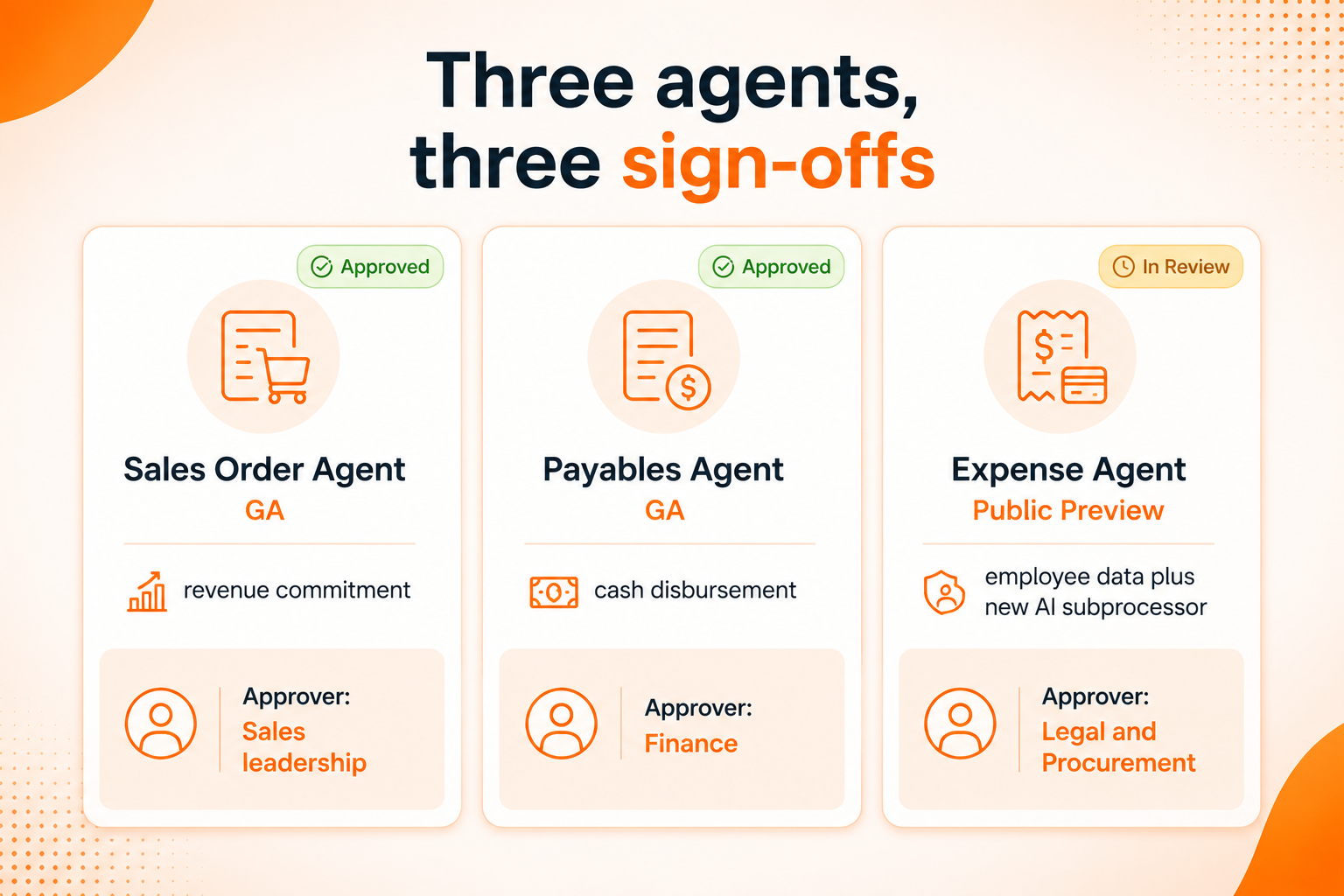
Sales Order Agent is generally available. Payables Agent is generally available, with real published limits worth knowing before you scope anything. No approval flow support, no anomaly detection, emails with PDF attachments only, skips emails with more than ten attachments, will not process PDFs over ten pages or 5MB, and caps at 100 emails and 500 invoices per day.
Expense Agent is public preview, explicitly labelled "production ready preview," and US and English only at launch. It also requires an administrator to formally approve Anthropic as an AI sub processor in the Microsoft 365 admin centre before it will run at all.
Read that last sentence again. That is a data processing decision, and it belongs in front of legal and procurement, not only IT.
Three agents, three genuinely different questions: a revenue commitment, a cash disbursement, and employee data plus a new subprocessor. Three signoffs, three owners.
Where the default stops short for construction
Here is the part nobody else is writing about.
"Add All Standard APIs as Tools" adds to every standard, first party Business Central API page. Standard Business Central has no native retainage management. Job cost ledgers, retainage schedules, AIA billing and WIP live in the ISV application layer, in products like ProjectPro.
So, a construction finance team gets conversational access to customers, vendors, the general ledger and standard purchase and sales documents essentially for free. Useful. Not what a controller loses sleep over.
The data you most want to interrogate (WIP exposure, retainage aging, cost to complete by job) is only reachable if two things are true. Someone explicitly added those extension API pages to the configuration. And the ISV exposed them as top level API pages in the first place.
When both are true, the payoff is real. A controller can ask "what is our WIP exposure on jobs over 60% complete with no retainage billed yet" and get an answer in the flow of a conversation, instead of exporting to Excel or queueing a BI request. That is genuinely new.
But "when both are true" is the entire argument. The demo works on sample data. Your actual WIP schedule needs someone to do the work first.

The wider context: most AI projects are not failing on technology
It is worth sitting against what is happening to AI projects generally, because the pattern is instructive.
Gartner forecast in June 2025 that over 40% of agentic AI projects will be cancelled by the end of 2027, citing escalating costs, unclear business value and inadequate risk controls rather than technical failure. Treat that as a forecast rather than a measurement. In the same release, Gartner coined the term "agent washing" for vendors rebranding existing chatbots and automation as agents, estimating that of the thousands of vendors claiming agentic capability, only around 130 genuinely have it.
Meanwhile, ServiceTitan's 2026 report on commercial specialty contractors found 38% now see measurable results from AI, up from 17% a year earlier. Real progress. It also means roughly six in ten still do not.
None of those failures are protocol failures. They are scoping, ownership, and data quality failures. Which is precisely why the interesting question about the Business Central MCP server is not "can it work" but "what have we decided to expose, who approved that, and is the underlying data clean enough to be worth asking about."
What to settle before you switch it on
Who holds the MCP administrator permission, and is that change logged like any other permission change?
Is the master write switch off, and what is the approval path to turn it on for a specific API page?
Have we made a conscious decision about object discovery, rather than inheriting a default?
Which of our construction API pages exist, and which are actually exposed?
Which agent are we piloting first, and has the right function signed off on it?
Is our job cost data clean enough that a confident sounding answer would be a correct one?
That last question is the one most likely to be skipped and most likely to hurt. An AI layer over inconsistent cost coding does not surface the inconsistency. It launders it into a fluent sentence.
The part that is actually hard
Construction firms have an advantage and a task. The advantage is that conversational access to ERP data has become a configuration exercise rather than a capital project. The task is that your most valuable data, meaning jobs, WIP and retainage, only becomes reachable if the ERP layer underneath was built to expose it properly.
ProjectPro is a construction ERP built on Business Central, with retainage, AIA billing, job costing, and WIP in the application rather than in a spreadsheet. If you are working out what conversational access to your project financials would look like, that is the conversation to start with, not the configuration page.
[ Talk to our team about ProjectPro → ]
Frequently Asked Questions
No. It is in public preview, auto-enabled from 31 October 2025 for environments on 2025 release wave 2 (BC 27.1). As of the release plan update on 27 August 2026, the General Availability field is still blank, though the how-to documentation carries no preview banner. That is an inconsistency in Microsoft's own documentation.
Only if an administrator allows it. The default is read only across all exposed API pages with no configuration required. Write access, including posting, must be enabled per API page, and a master switch overrides everything beneath it.
Yes, but not casually. Non-Microsoft clients need your tenant administrator to register an Entra application, configure redirect URIs and grant delegated permission with admin consent. Microsoft clients such as Copilot Studio use a preregistered app and need almost none of that.
Not by default. Those entities live in an ISV extension rather than standard Business Central, so they fall outside what the "Add All Standard APIs as Tools" button covers. They must be exposed as top-level API pages by the ISV and then explicitly added to your configuration.
Pilot now, commit later. The configuration decisions, data quality work and sign-off model take longer than the technical enablement, and none of that work is wasted when GA arrives.
Keep reading

Business Central Features for CFOs: Are You Using What You Already Have?

Accounts Payable Automation Software and the 34-Point Gap in Who Gets Paid on Time in Construction

Breaking Down Dynamics 365 Business Central Essentials, Premium, and Team Members Licensing
Ready to build smarter? Let's talk.
Our experts are ready to help you turn ideas into production-ready AI, cloud and digital solutions.
Get In Touch →Let's Discuss Your Growth Strategy
Let's discuss how we can help you accelerate growth, improve efficiency, and drive real business outcomes.